Pet portrait look
Pumpkin Pet
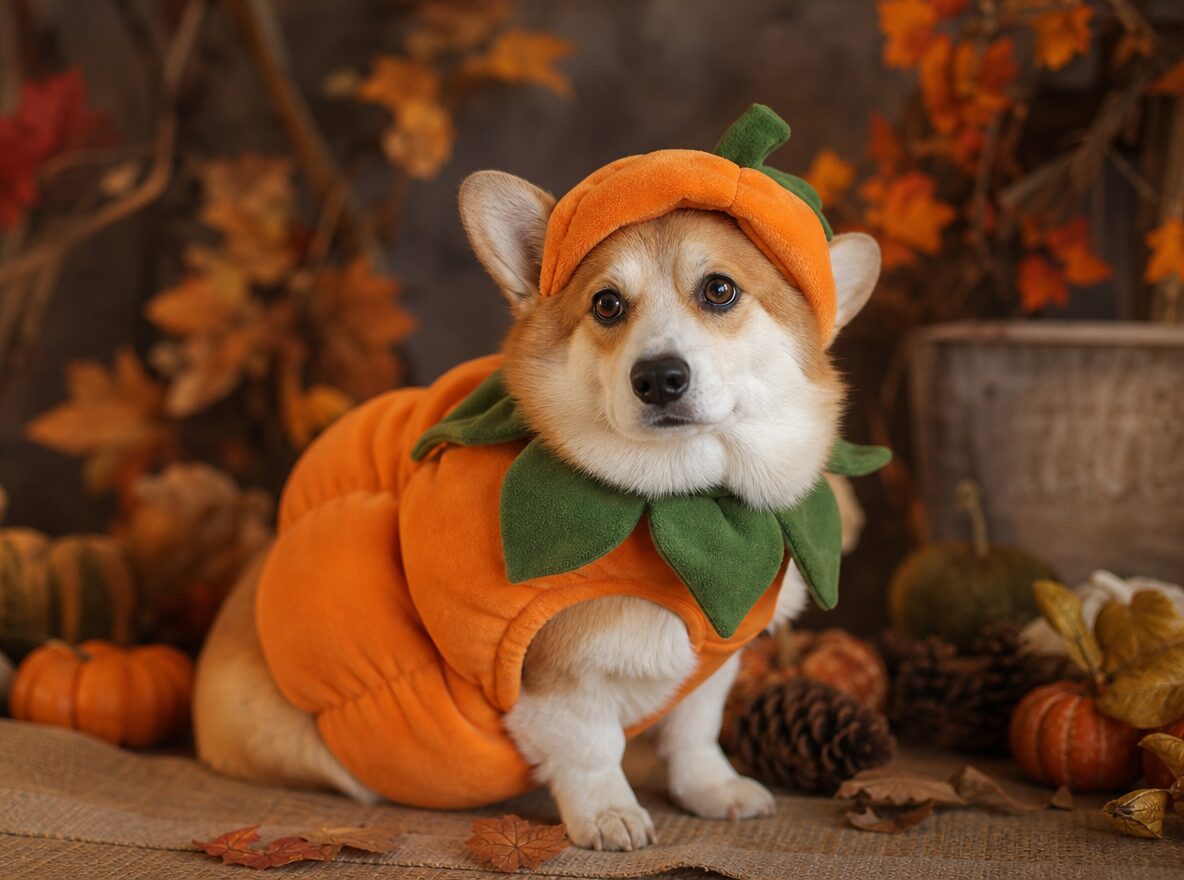
Put a dog or cat in a soft pumpkin costume without changing its breed, markings or eyes. Copy the pet portrait prompt and generate.
Pet costume edits fail when the animal stops being the animal. The breed changes, the markings move, the eyes turn human or an extra paw appears. The fix is to describe the pet's identity before the costume, then keep the costume simple and fitted.
This pumpkin look is designed for a seated pet photo with a clear face. The costume is soft and does not cover the eyes. The setting is a warm autumn studio, which gives the fur a natural edge and keeps the image from looking like a cartoon.
What changes
Costume: a soft pumpkin body with a small green leaf collar.
Setting: a cozy autumn studio with miniature pumpkins and dried leaves.
Light: warm, soft studio light with natural shadows.
Identity: breed, fur color, markings, eye color and anatomy stay the same.
Prompt recipe
This is model input, so it stays in English. Change the wardrobe, scene and light lines; keep the identity and anatomy lines.
Use the uploaded pet photo as the primary reference. Preserve the animal's original breed, fur color, distinctive markings, eye color, facial appearance and natural anatomy. Dress the pet in a soft pumpkin-inspired Halloween costume with a small green leaf accessory. Keep the costume fitted naturally without covering the animal's eyes or changing its species. Place the pet in a cozy autumn photography studio with warm lighting and miniature pumpkins. Create a photorealistic professional pet portrait with realistic fur texture and natural shadows. Keep the same number of animals as the uploaded photo. Avoid extra animals, extra paws, duplicated limbs, changed breed, changed markings, text, logos and watermarks.
Negative prompt
Extra animals, extra paws, duplicated limbs, human eyes, changed breed, changed markings, cartoon, plastic fur, text, logo, watermark.
Image-to-video prompt
Use the provided image as the exact starting frame. Five-second pet portrait: the pet blinks, tilts its head slightly, the leaf collar moves, warm light shifts gently, one slow push-in. Keep the breed, markings, eye color and costume consistent. Maintain realistic motion, stable anatomy and consistent lighting. Do not change identity, replace the costume, add characters or introduce sudden scene cuts. No text or watermarks.
Try it in the browser
The generator below is already set to the right mode and prompt. Upload a photo, check the cost, then generate.
How to get a clean result
Use a seated photo
A clear seated pose shows the body shape and keeps the costume from fighting the legs. Avoid a photo where the pet is moving.
Name the markings
Describe the patch over one eye, the white chest or the brindle pattern. Generic "cute dog" language lets the model invent a new animal.
Keep the costume off the eyes
A leaf collar and a soft body are enough. Hats and hoods usually hide the face and cause identity drift.
Best for
- A Halloween portrait of a dog or cat
- A pet costume idea before buying one
- A social post or family card
- A first frame for a pet video
Limits to plan around
- The model does not know real pet sizing or costume safety.
- Dark fur can lose detail in a low-key studio scene.
- A pet in motion gives the model an ambiguous body shape.
- Never use a costume that covers the animal's eyes or restricts breathing in real life.
Questions
Can I use a photo of my own pet?
Yes, if you have the rights to the photo. A sharp, seated image with a visible face works best.
Why did the breed change?
The prompt needs the breed, markings and eye color stated explicitly. Add those lines and remove secondary costume details.
Can I make a cat version?
Yes. Replace dog-specific language with cat anatomy and keep the pumpkin costume and studio setting.
Can I animate the pet portrait?
Yes. A blink, a small head tilt and a gentle light shift are safer than walking or jumping.
Generate this look
The generator below is already set to the right mode and prompt. Upload a photo, check the cost, then generate.