Start with a photo
AI Halloween Costume Generator
Upload a selfie and generate an original Halloween costume portrait. Keep your face recognizable, preview the look, then animate it into a short video.
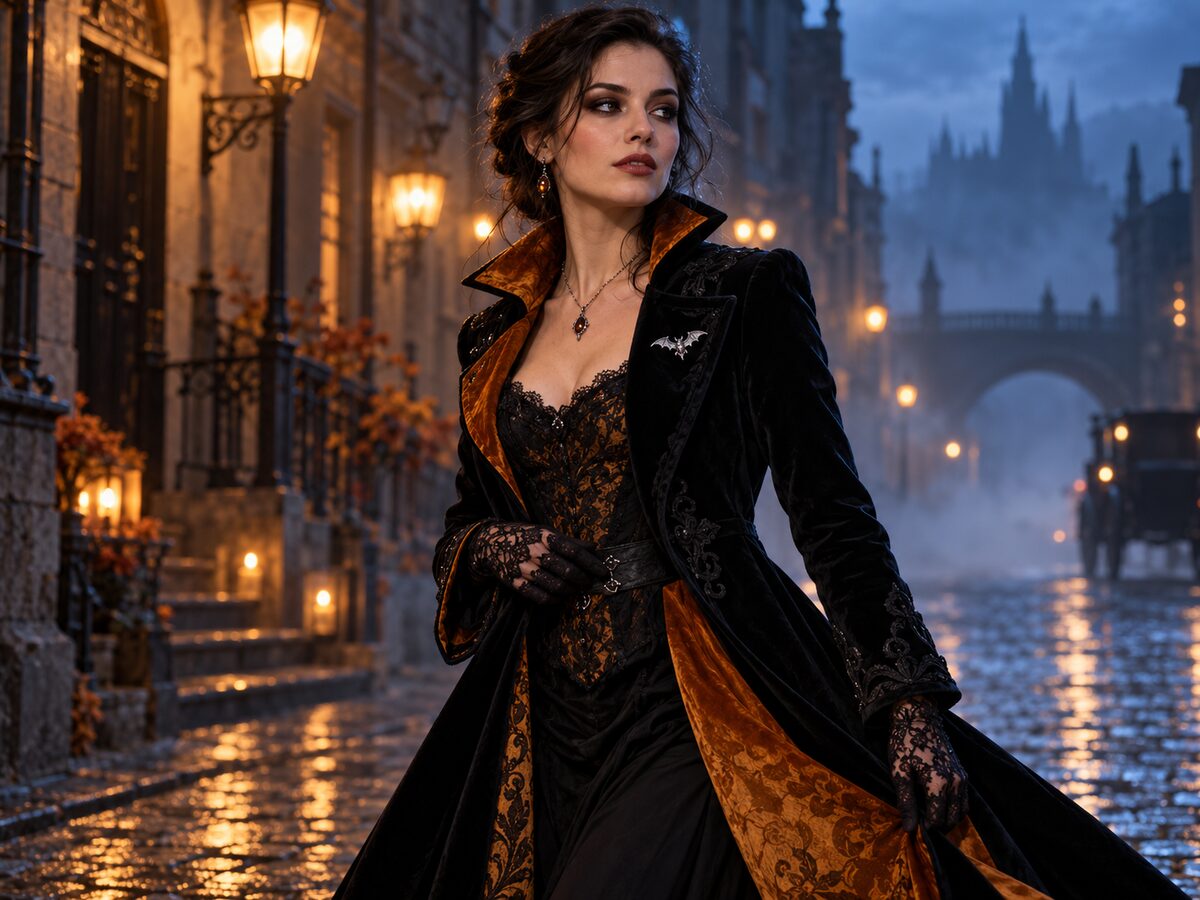
A costume generator should change the outfit, not the person. The useful output is a portrait where your face, skin tone, age and body proportions still read as you, while the clothing, background and light become something you could not photograph at home.
This page is built around that constraint. Upload one clear photo, keep the prompt focused on wardrobe and scene, and check the result at full size before you animate it. The generator below opens in image edit mode with the recipe already loaded.
What changes
Wardrobe: an original tailored Halloween costume with fabric, trim and accessories described in plain language.
Setting: a foggy street at dusk with warm lantern light and a cool rim light.
Mood: cinematic editorial photography instead of a costume-shop snapshot.
Identity: face, skin texture, age and pose stay anchored to the uploaded photo.
Prompt recipe
This is model input, so it stays in English. Change the wardrobe, scene and light lines; keep the identity and anatomy lines.
Use the uploaded photo as the primary reference. Preserve the subject's recognizable facial identity, facial proportions, skin tone, approximate age and natural anatomy. Transform the subject into an original cinematic Halloween costume portrait. Replace the outfit with an elegant black velvet coat with deep amber lining, lace gloves and a small silver bat brooch. Keep the pose natural and the body proportions unchanged. Place the subject on a foggy cobblestone street at dusk with warm lantern bokeh and a cool blue rim light. Use photorealistic editorial photography, realistic fabric texture, natural skin detail and an 85mm lens look. Keep the same number of people as the uploaded photo. Avoid altered facial identity, extra limbs, duplicated fingers, distorted anatomy, text, logos and watermarks.
Negative prompt
Cartoon, illustration, plastic skin, costume-shop background, changed face, extra people, extra fingers, warped hands, text, logo, watermark.
Image-to-video prompt
Use the provided image as the exact starting frame. Create a five-second cinematic Halloween portrait. The subject slowly turns their head toward the camera with a calm, mysterious expression. A gentle breeze moves loose hair and the coat edge. Soft fog drifts through the street. Slow smooth push-in. Keep the face, costume and lighting consistent. Maintain realistic motion, stable anatomy and consistent lighting. Do not change identity, replace the costume, add characters or introduce sudden scene cuts. No text or watermarks.
Try it in the browser
The generator below is already set to the right mode and prompt. Upload a photo, check the cost, then generate.
How to get a clean result
Choose a clear photo
Use a front-facing or three-quarter photo with even light and no heavy filter. One person works best for a costume portrait.
Edit the wardrobe slots
Change the coat, trim, accessory and setting lines. Keep the identity and anatomy sentences untouched.
Check the hands and edges
Open the result at full size. Re-run with a simpler accessory if fingers, cuffs or hair edges break down.
Best for
- A last-minute costume preview before a party
- A profile photo or story image with a Halloween theme
- Testing a costume idea without buying the outfit
- Creating a reusable character look for a short video
Limits to plan around
- The model edits a photo; it does not measure real garment fit or sizing.
- Small jewelry and fine lace can merge at low resolution.
- A face turned too far away from the camera gives the model less identity signal.
- Do not ask for a real brand costume, a copyrighted character or a living person's likeness.
Questions
Can I upload a photo and keep my own face?
Yes. The prompt explicitly preserves facial identity, skin tone, age and body proportions. The result is still a generative edit, so check the eyes, hands and hairline before using it.
Is this a virtual try-on with real sizing?
No. It is a visual preview, not a garment fitting tool. Use it to judge a look, color direction and mood, then buy a real costume separately.
Can I generate a specific movie character?
Describe an original costume instead. Named characters and studio-owned designs raise copyright and trademark issues, and the model is not a licensed replica tool.
Can I animate the result?
Yes. Switch to image-to-video and use the provided five-second motion prompt for a slow head turn, drifting fog and a gentle push-in.
Generate this look
The generator below is already set to the right mode and prompt. Upload a photo, check the cost, then generate.