Sci-fi hero look
Galactic Hero
Create an original sci-fi hero portrait with brushed armor, a dark bodysuit and a visor held aside so the face stays human. Prompt and generator included.
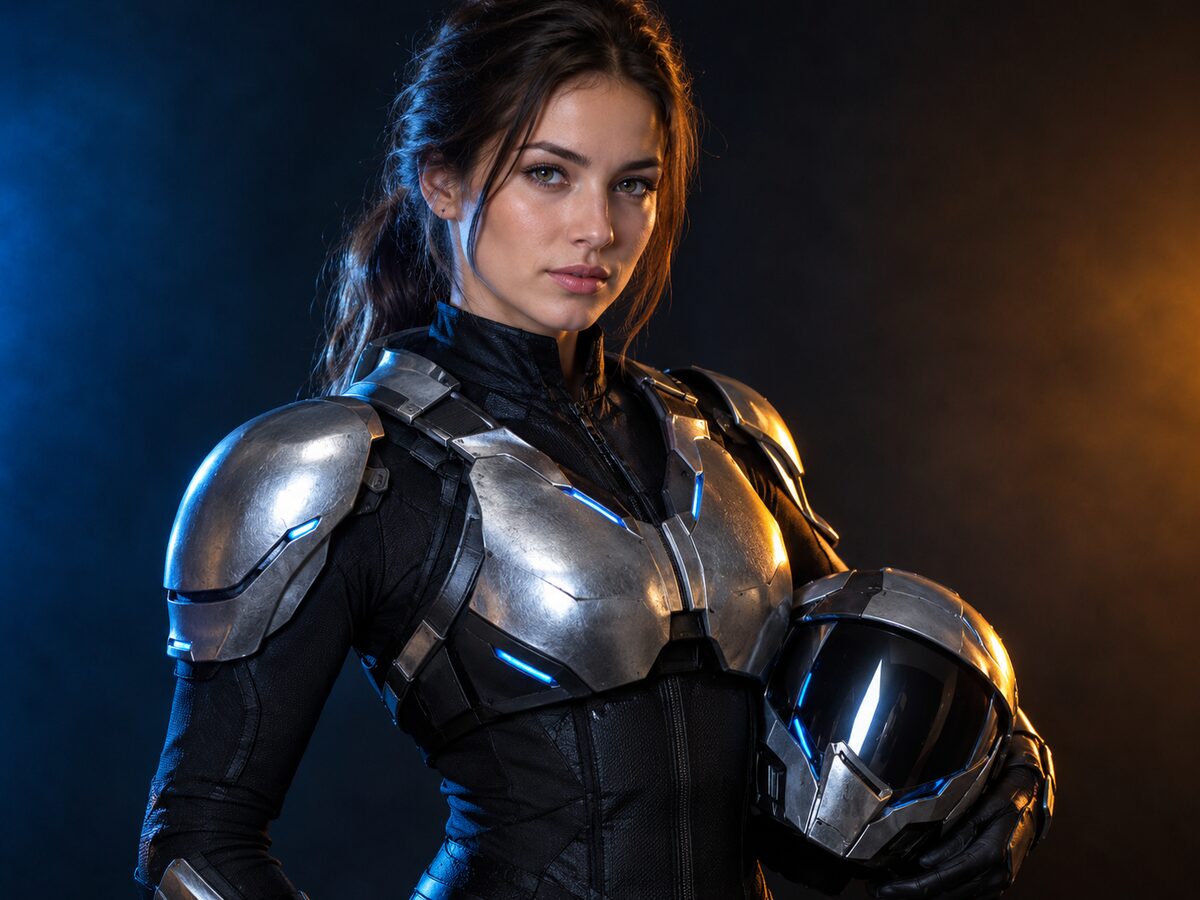
The useful version of a sci-fi hero costume keeps the person visible. Full helmets and face plates hide the identity that makes a photo worth editing. This look puts the armor on the shoulders and body, then holds the visor at the side so the face stays human.
It is an original design: brushed metal panels, a dark fitted bodysuit and controlled blue accents. Choose a portrait with a clear face and a neutral background, then adjust the armor color rather than adding more props.
What changes
Armor: brushed silver shoulder and chest panels over a dark fitted bodysuit.
Visor: a sleek visor held at the side, not worn over the face.
Light: cool blue accent light with a warm amber key on the skin.
Setting: a dark seamless studio with subtle atmospheric haze.
Prompt recipe
This is model input, so it stays in English. Change the wardrobe, scene and light lines; keep the identity and anatomy lines.
Use the uploaded photo as the primary reference. Preserve the subject's recognizable facial identity, facial proportions, skin tone, approximate age and natural anatomy. Transform the subject into an original sci-fi hero portrait. Add brushed silver shoulder and chest armor over a dark fitted bodysuit, with articulated panels and subtle blue accent lights. Keep the human face fully visible and hold a sleek visor at the side instead of wearing it. Use dramatic cool blue and warm amber studio lighting, a dark seamless background with light haze, and realistic metal and fabric reflections. Keep the same number of people as the uploaded photo. Avoid altered facial identity, extra limbs, duplicated fingers, distorted anatomy, text, logos and watermarks.
Negative prompt
Full helmet covering the face, robot head, plastic armor, cartoon, extra people, extra limbs, distorted hands, copied superhero emblem, text, logo, watermark.
Image-to-video prompt
Use the provided image as the exact starting frame. Five-second cinematic portrait: the subject slowly turns toward the camera, the shoulder armor catches a moving blue rim light, a faint haze drifts across the background, one slow push-in. Keep the face, armor and lighting consistent. Maintain realistic motion, stable anatomy and consistent lighting. Do not change identity, replace the costume, add characters or introduce sudden scene cuts. No text or watermarks.
Try it in the browser
The generator below is already set to the right mode and prompt. Upload a photo, check the cost, then generate.
How to get a clean result
Keep the face uncovered
Use a portrait with a clear face and no hat. Ask for the visor to be held, not worn.
Choose one armor color
Silver, gunmetal or a single anodized color reads better than a mix of metals and glowing strips.
Check the shoulders and hands
Armor edges and fingers are the first things to break. Simplify the panels if the silhouette warps.
Best for
- A sci-fi or space-themed Halloween portrait
- A costume preview without building armor
- A character reference for a short video
- A group look with distinct armor colors
Limits to plan around
- The model does not produce a wearable or printable armor design.
- Glowing strips and small panel lines can blur at low resolution.
- A face turned away from the camera gives the model less identity signal.
- The look is original; do not ask for a licensed superhero or a real person's likeness.
Questions
Will the helmet cover my face?
Not in this recipe. The prompt explicitly keeps the face visible and holds the visor at the side. Remove the visor sentence if you want a different prop.
Can I make the armor gold or red?
Yes. Replace brushed silver with one other metal color, but keep the panel structure and light setup so the armor still reads as a real material.
Why do the hands look wrong?
Armor and props give the model more edges to invent. Remove the held visor or simplify the gloves, then re-run.
Can I animate this portrait?
Yes. Use the five-second prompt with a small head turn and a moving rim light. Avoid fast camera moves that reveal the studio edges.
Generate this look
The generator below is already set to the right mode and prompt. Upload a photo, check the cost, then generate.